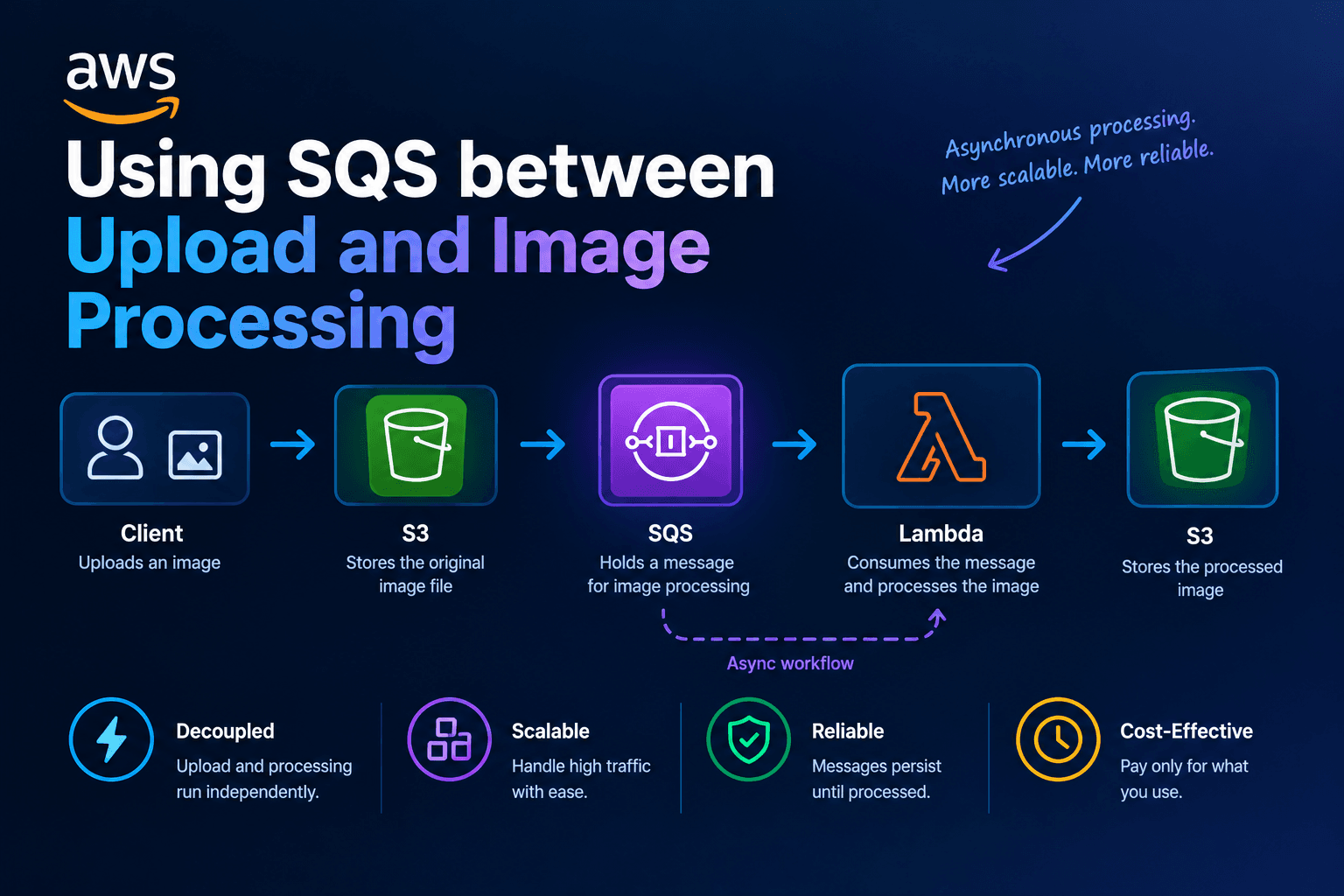
Using SQS between upload and image processing
How to send a small job to Amazon SQS after the file is in S3. Covers SendMessage, long polling, visibility timeout, and deleting the message only after the worker finishes.
This post is about putting Amazon SQS between the upload and the image work. The upload route from the previous article stores the original cover in Amazon S3 and returns 202. The site still needs an 800 px WebP for the recipe card. If the API waits for that resize, you are back to the problem in the last post.
A queue is a durable list of jobs. A separate process reads the next job when it has capacity. Amazon SQS is that list.
The API writes a small message after the object lands in S3. A worker long-polls the queue, resizes the image, then deletes the message.
Sunday Pantry is a small recipe website. Cover photos are the jobs in this example.
What Amazon SQS is
SQS holds messages. Each message is a string, usually JSON, plus metadata. You do not query it by coverId. You receive the next available message, do the work, and delete the message.
This series uses a standard queue. Standard queues deliver at least once. A message can show up twice. The worker must tolerate a second pass.
FIFO queues exist for ordered, exactly-once processing within a group. Cover resizes do not need that cost.
Visibility timeout is a hide timer on a message. After a worker receives it, other workers cannot see it for that many seconds. If the worker crashes without deleting the message, the message becomes visible again. That is the retry.
The message stays in the queue while it is hidden. That hidden state is called in flight. Delete it, and it is gone. Leave it, and it reappears after the timeout.
Visibility timeout is a strong hint, not a lock. Standard queues do not guarantee that two consumers never see the same message during the timeout. A later article, after the dead-letter post, adds DynamoDB for a real claim.
Do not send the image bytes through the queue. SQS messages are small. The object already lives in S3. Put the S3 key in the message. Workers fetch the file from S3 when they are ready.
A small example
Keep the S3 PutObject from the previous article. After it succeeds, send one JSON payload.
import {
  SendMessageCommand,
  SQSClient,
} from "@aws-sdk/client-sqs";

const sqs = new SQSClient({ region: "us-east-1" });

type CoverJob = {
  coverId: string;
  bucket: string;
  key: string;
  contentType: string;
};

const enqueueCoverJob = async (
  queueUrl: string,
  job: CoverJob,
) => {
  await sqs.send(
    new SendMessageCommand({
      QueueUrl: queueUrl,
      MessageBody: JSON.stringify(job),
    }),
  );
};
SQSClient is the AWS SDK client for SQS. The region is us-east-1, same as the S3 client in the last post.
CoverJob is the JSON shape of the message. It names the cover, the bucket, the object key, and the content type. It does not include pixels.
SendMessageCommand writes that JSON to the queue. QueueUrl is the address of the queue. MessageBody must be a string, so the job is passed through JSON.stringify.
Call enqueueCoverJob after PutObject and before you answer 202. Persist first, enqueue second. If you send the job before PutObject completes, the worker then calls GetObject on a key that is not there yet.
If the queue send fails, the original is still in S3. You can retry enqueue, or surface an error and let the client retry the whole upload. Pick one and log it. Do not report that the cover is queued if SendMessage threw.
A worker is a loop. It asks SQS for messages, processes each body, and deletes.
import {
  DeleteMessageCommand,
  ReceiveMessageCommand,
} from "@aws-sdk/client-sqs";

const receiveCoverJobs = async (queueUrl: string) => {
  const result = await sqs.send(
    new ReceiveMessageCommand({
      QueueUrl: queueUrl,
      MaxNumberOfMessages: 10,
      WaitTimeSeconds: 20,
      VisibilityTimeout: 30,
    }),
  );

  return result.Messages ?? [];
};

const forgetCoverJob = async (
  queueUrl: string,
  receiptHandle: string,
) => {
  await sqs.send(
    new DeleteMessageCommand({
      QueueUrl: queueUrl,
      ReceiptHandle: receiptHandle,
    }),
  );
};
ReceiveMessageCommand asks SQS for work. MaxNumberOfMessages: 10 is the per-call cap for a standard queue receive.
WaitTimeSeconds: 20 turns on long polling. SQS waits up to 20 seconds, the maximum, for at least one message instead of answering empty right away. That cuts empty responses and cost compared with short polling (WaitTimeSeconds: 0). Short polling samples a subset of servers and can return empty even when a message exists.
VisibilityTimeout: 30 on the receive matches a queue default of 30 seconds. While the worker resizes, other consumers skip this message. If 30 seconds is tighter than Sharp plus PutObject on a slow day, raise it or call ChangeMessageVisibility while you work. The clock starts when SQS delivers the message. The maximum visibility from first receive is 12 hours.
You delete with a receipt handle, not the message id. The handle is tied to this delivery. After a retry, you get a new handle. The message id identifies the message. It is not exclusive ownership of the cover.
The loop looks like this:
const runCoverWorker = async (queueUrl: string) => {
  while (true) {
    const messages = await receiveCoverJobs(queueUrl);

    for (const message of messages) {
      const body = message.Body;
      const receiptHandle = message.ReceiptHandle;

      if (!body || !receiptHandle) {
        continue;
      }

      try {
        await resizeCoverFromJob(JSON.parse(body));
        await forgetCoverJob(queueUrl, receiptHandle);
      } catch (error) {
        console.error("Cover job failed; leaving message for retry", error);
      }
    }
  }
};
The worker runs forever. Each pass long-polls for up to 10 messages. For each message it reads the body and the receipt handle. If either is missing, it skips that item.
JSON.parse(body) turns the string back into a CoverJob. Put that parse behind try/catch. A poison body that is not JSON will throw forever. That is what a dead-letter queue is for, in the next post. Do not delete garbage if you want to inspect it.
resizeCoverFromJob downloads the original with GetObject, writes a WebP under a new key, and returns. Keep that function idempotent: if the WebP already exists, skip the CPU work. At-least-once delivery will eventually duplicate a message. Two workers can both resize. A second write to the same key overwrites the first. That is fine. Skipping work when the derivative already exists saves CPU.
On success, delete the message. On failure, do not delete. When visibility expires, another receive can try again.
How it works
The path from upload to resize has four steps.
SendMessagestores the job on SQS servers.ReceiveMessagewith a wait greater than zero queries servers and holds the connection until a message appears or the wait ends.- The message stays in the queue. It is only hidden. That hidden state is in flight.
- If you delete, it is gone. If you do not, it reappears after the timeout.
Match visibility to work time. Too short: another worker starts while Sharp still runs, and you pay twice. Too long: a crash delays the retry for minutes.
Delete only after the derivative is in S3. If you delete first and then PutObject fails, the job is gone and the original sits unused.
For standard queues, in-flight messages have a high cap, on the order of 120,000. Hitting it with short polling yields OverLimit. Long polling waits instead of erroring. Prompt deletes keep the count down.
Common mistakes
Deleting in a finally block. That treats failure as success. The job vanishes and the cover never resizes.
Short polling in a tight loop. You pay for empty receives and can miss messages that sit on servers you did not sample.
Assuming exactly-once delivery. Two workers can both resize. Make the S3 write safe. Same key overwrite is fine. Skip the resize if the derivative already exists.
Sending the job before PutObject completes. The worker then calls GetObject on a key that is not there yet. Persist first, enqueue second.
Using the message id as a lock. The id identifies the message, not exclusive ownership of the cover. Use the receipt handle to delete. Use DynamoDB later if you need a real claim.
Putting pixels in the message. Queue payloads stay tiny. Put the S3 key in the JSON. The worker fetches from S3 when it is ready.
Deleting before the WebP is stored. A failed PutObject after a delete leaves an original with no job to process it.
When you do not need this
If every resize is 20 ms and you have one instance, an in-process queue (setImmediate) might suffice. It dies with the process. SQS outlives the API box.
If you need a queryable job table, for example “show me all covers still stored,” SQS is not that table. Pair it with DynamoDB or another store. The queue is the trigger. The table is the status.
Uploads stay fast. Jobs wait in SQS. A worker long-polls, resizes, and deletes. Failures retry when visibility expires. The next post covers jobs that fail every time, and the dead-letter queue that stops them from looping forever.
Further reading
- Amazon SQS visibility timeout – hide, retry, and the 12-hour cap
- Amazon SQS short and long polling –
WaitTimeSecondsand empty responses - Previous: Saving uploaded images to S3
- Next: SQS dead-letter queues
Related posts
- Saving uploaded images to S3
How a Node.js API writes the original file to Amazon S3 with PutObject and returns HTTP 202. Resizing happens later, not in the same request.
- Log-Structured Merge Trees: Fast Writes Without Rewriting Pages
How LSM trees buffer writes in memory, flush sorted files, compact in the background, and trade read and space costs for high ingest – plus when a B-tree still fits better.
- Database Indexes Explained: Find Rows Without Scanning Everything
A practical guide to database indexes: what they are, how B-trees find rows, when composite and covering indexes help, and when another index only slows your writes.